How It's Made - The Homelab (if I can call it that)
2025-12-22
Set And Setting
I just turned 30. My beard’s filling in. It’s time to make a homelab and get into self-hosting. To dip my toes in, I looked online for something a step above a Raspberry Pi but in the same price range. I found it. I went to a protest. I bought a little computer off some middle-aged dude on the steps of the Sofia National Theatre. The government resigned the next day.
The Machine
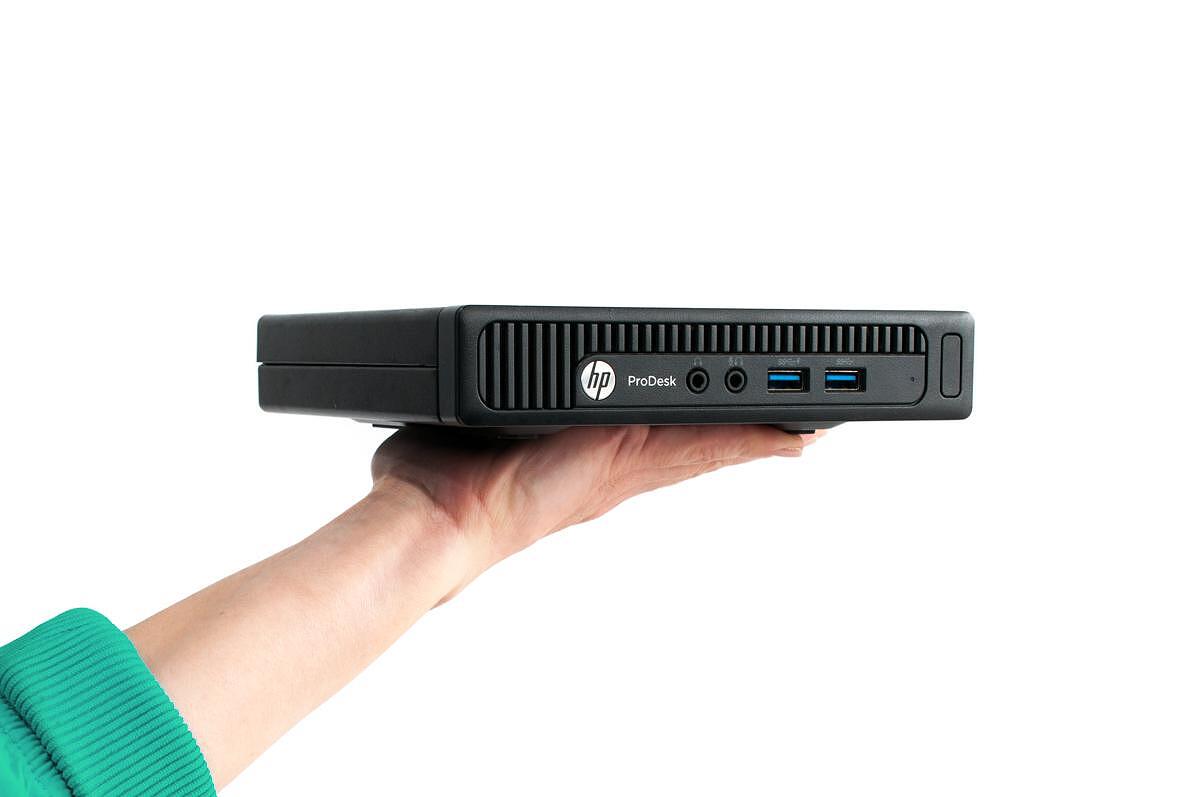
An honest-to-god HP ProDesk G2 600 with an Intel i5, 16GB of DDR4 RAM and a 500GB SSD. Running Ubuntu Server 24.04. Not impressive by any standards, but sufficient for what amounts to a personal “cloud infrastructure”. The machine sits above my TV and behind my ISP’s gateway, creating a networking topology that would later cause me to sneak out of bed in the middle of the night to shuffle LAN cables while trying not to wake up my girlfriend.
The Vision
Self-host everything. Own your data. Control your infrastructure. Give a corporation the finger (not the one that pays me, it’s the only good one). The typical motivations that drive people to spend weekends configuring servers instead of using managed services.
The requirements:
- Photo backup with mobile access and scripted regular backups to an external drive
- Git hosting for personal projects and showing off.
- A self-deploying blog platform where I just push my posts as source code - you’re here
- Infrastructure monitoring
- Accessible anywhere via HTTPS
The Plumbing
I bought the domain for 2 years at the very likeable price of 5 dollars. I ran it through CloudFlare for the added security tools and better analytics on traffic. I’m behind 2 NATs on any end device of my home network. I have an ISP gateway and a router. I took turns placing my server behind each and now it’s stuck right behind the gateway.
The Services - containers all the way
Everything runs in Docker containers, each with its own compose file for isolation and maintainability. I really like the whale logo.
Immich: Self-hosted photo backup with a really nice mobile app. Deploying it went first and I only had one issue - port mappings changed between versions, requiring adjustments after some googling.
Gitea: GitHub but it’s sitting above my TV and making fan noises every now and then. Sure, GitHub is free but this one is my own.
Nginx Proxy Manager: Handles reverse proxying and SSL certificate management. Makes it trivial to add new services and request Let’s Encrypt certificates. Handles anything accessible on the outside.
Portainer: Web-based Docker management. Useful for getting quick container info without SSH access. I might keep it, I might not.
A DIY Simple DDNS Updater: Synchronizes dynamic IP addresses with Cloudflare DNS records. This proved essential given that I don’t have a static IP but ended up causing me a lot of issues when I forgot to make it update the correct place.
Tailscale: Mesh VPN providing secure access to internal services without port forwarding. Also serves as a workaround for NAT loopback limitations.
This Blog: Built with SvelteKit, served via nginx, deployed automatically via webhooks. The entire deployment pipeline runs on the same server.
The Kicker
I have an old 1TB external HDD in good health (checked) that I decided to use for incremental backups of my photos. Automated daily backups run at 0200 hours via systemd timer, mounting the drive for the duration of the backup and keeping 7 days of history. The idea being that I get to have a “2” in the 3-2-1 backup rule and the drive spins down when not in use.
The (Mostly Networking) Problems
SSLn’t
The initial deployment of services was smooth sailing all the way until I decided to try accessing one through my phone’s 5G. Then started the troubles with NPM (nginx proxy manager, not the node package manager). Either due to improper routing and networking configuration or who knows what, I couldn’t get a certificate with the HTTP challenge method. This lead to moving nameservers to Cloudflare and using the API to request certificates with the DNS method.
Two NATs for the price of one
The initial “topology” placed the server behind both my ISP gateway and my router, creating double NAT. Port forwarding rules existed on both devices. Services worked from the local network but were unreachable from external.
The solution involved me facepalming when I realized I could eliminate one layer entirely and connecting the server directly to the gateway. This was my first “big” breakthrough.
The only constant (IP) is change
While troubleshooting why I can’t reach anything externally, Claude went through some logs and saw I had 3 IP changes in the span of a day. The root cause: the DDNS updater was configured for Namecheap (where I bought the domain), but DNS had been migrated to Cloudflare for the free API access. When the public IP changed, the actual DNS records never updated.
NAT Loop-de-loop(back)
The gateway I have doesn’t support NAT hairpinning (or at least I didn’t find a weirdly named option for it). This prevents accessing my services with their public domains from the internal network. For the time being I’ve resorted to editing the hosts files on local machines. Tailscale is also an option as mentioned earlier.
Not killing my old external HDD - only one I haven’t solved
Sike! I fixed it and it’s been running great - read more
It spins down when not in use. Or at least that was the idea. While troubleshooting DNS at around 3AM I wend to unplug a LAN cable and heard the little HDD idling. This means the spindown doesn’t work quite right so the HDD stays idling at all times which would kill it rather quickly. At the time of writing this I’m still working on it.
AI-Assisted Development
This entire setup was built with assistance from Claude Code. Every configuration file, troubleshooting session, and architectural decision involved Claude. I don’t know how to do many of these things by heart or at all and this whole adventure would have taken a couple weeks at least.
Claude did all the heavy lifting on favorites such as interpreting errors, handling mismatches in networking and writing documentation and configs. I provided context, made final decisions, and occasionally overruled suggestions with my personal preference or (rarely) where I knew Claude was wrong. This gives me a full setup that is both working for me and teaching me about its workings. AKA I am learning about how this works while it works in my own living room.
Key Takeaways
Network topology matters. NAT, forwarding ports, proxying DNS, etc. Crouching over LAN cables in your underwear on a freezing night. I have a lot to learn.
Dynamic DNS is a fact of life I’m sure ISPs change IP addresses just to mess with you. Automated DDNS definitely saved me a couple times.
It’s loog! It’s loog! It’s better than bad - it’s good! It’s good to have everything diligently logging its every step. Even better when you have AI read the logs for you.
Container orchestration simplifies management. Claude Code says: “Docker Compose provides clear service definitions, easy updates, and straightforward rollbacks.”
VPN access solves edge cases. Tailscale addresses the NAT loopback issue and the “I’m not home right now” issue. It also simplifies network architecture. Wireguard on its own eliminates the need of a 3rd party service so it’s on the table.
Let’s Crunch The Numbers
I didn’t do this to save money. I did it as a testament to my love for technology and upcycling redundant machines. But it actually saves money:
Annual Costs:
- Domain registration: ~€2.50/year
- Electricity: ~€5/month (€60/year)
- Hardware: €50 one-time (amortized over 5 years: €10/year)
- Total: ~€72.50/year
Equivalent Services:
- Google Photos: €10/month
- GitHub Pro: €4/month
- Static site hosting: €5-20/month
- Total: ~€228-408/year
The financial case is especially strong when you include the lessened time investment with AI assistance. Learning new skills to me is worth a lot of money especially when I start getting paid for it.
So What Now?
The homelab runs continuously. Services remain accessible anywhere. SSL certificates renew automatically. Backups execute daily. IP address changes propagate to DNS without intervention. Deployments trigger on git push for this blog (read the article on it to learn more). It’s cheaper than the sum of its parts. It’s a lot more complicated than clicking “buy” and drag and dropping files around but to become a gandalf-level nerd you gotta walk a certain path and I feel I’m going in the right direction.
itaintmuchbutitshonestwork.jpg
Also the server is called lucien after the librarian of the dream world from The Sandman (graphic novel, not the slop show). If you really got this far, thanks <3.